Meta description (154 characters): Zoho CRM vs Bigin compared by a solo founder who actually tested both. Real screenshots, real setup time, and an honest pick for small teams.
Affiliate Disclosure: This post contains affiliate links. If you sign up through them, I may earn a commission at no extra cost to you. I only recommend tools I’ve personally tested. Read our full Affiliate Disclosure for details.
If you’ve searched “Zoho CRM vs Bigin,” you’re probably in one of two camps: you’re already using Zoho CRM and wondering if you’re overpaying for features you don’t need, or you’re a solo founder looking at Zoho’s ecosystem for the first time and don’t know which product to even sign up for.
I’ve used Zoho CRM for a few weeks now, and I recently spent time inside Bigin — Zoho’s simplified CRM built specifically for small teams — to see if it’s the better starting point for someone running a one-person or under-10-person operation. Here’s what I found, with actual screenshots from my own account, not marketing pages.
Quick Answer (If You’re in a Hurry)
- Choose Bigin if you’re a solo founder or a team under 5 people who just needs a clean pipeline to track deals, without a steep learning curve.
- Choose Zoho CRM if you’re already scaling past basic sales tracking and need deeper customization, advanced automation, or multi-department workflows.
For most solo founders reading this, Bigin is the more realistic starting point. Here’s why.
What’s the Actual Difference?
Zoho CRM is Zoho’s flagship, full-featured CRM — built to handle everything from lead scoring to territory management to complex multi-stage sales processes. It’s powerful, but that power comes with a learning curve.
Bigin is Zoho’s answer to “what if a CRM only did the essentials, really well?” It’s pipeline-first, visual, and clearly designed for founder-led sales — the kind where you personally know every deal in your pipeline by name.
Setting Up Bigin: My Actual Experience
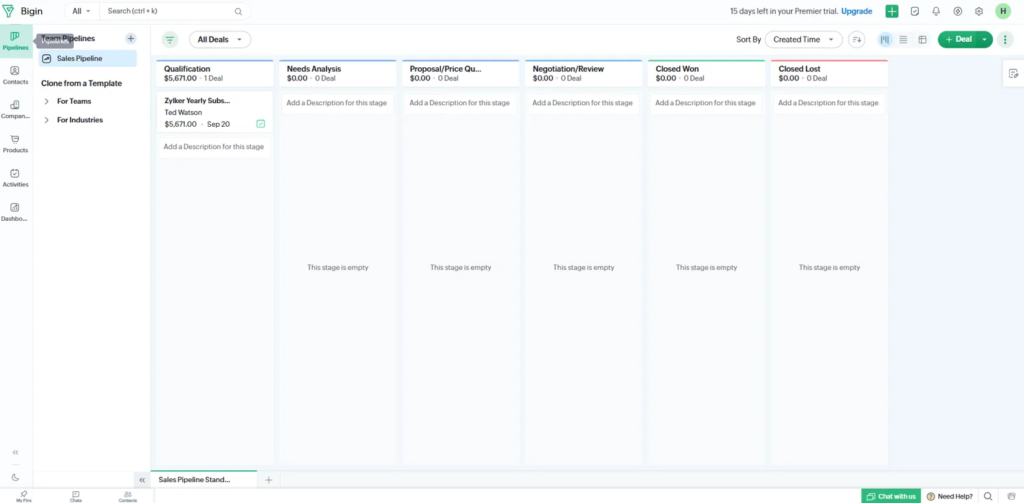
I signed up for Bigin using the same Zoho account I already had from testing Zoho CRM. Setup asked me to name a pipeline, and within a couple of minutes I was looking at a clean, ready-to-use deal board with the standard stages: Qualification, Needs Analysis, Proposal/Price Quote, Negotiation/Review, Closed Won, Closed Lost.
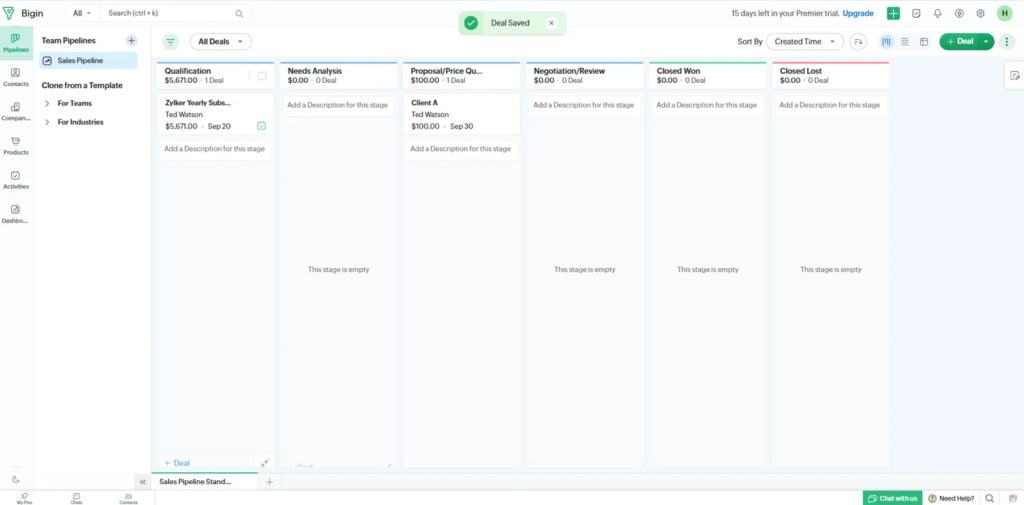
I created a test deal, gave it a name and a value, and dragged it from Qualification into Proposal/Price Quote. It just worked — no confusing menus, no “where do I click to move this” moment. It took me a few minutes total, and it was genuinely easy, noticeably easier than the first time I opened Zoho CRM.
One honest note: I was testing on Zoho’s Premier trial rather than the permanent Free plan, so if you’re on the Free tier specifically, you may see a slightly more limited feature set than what’s shown here. The core pipeline experience, though, should be the same across plans.
Automation: Simpler Than I Expected
Zoho CRM’s automation tools are powerful but can feel like a lot to configure if you’ve never set up a workflow rule before. Bigin strips this down.
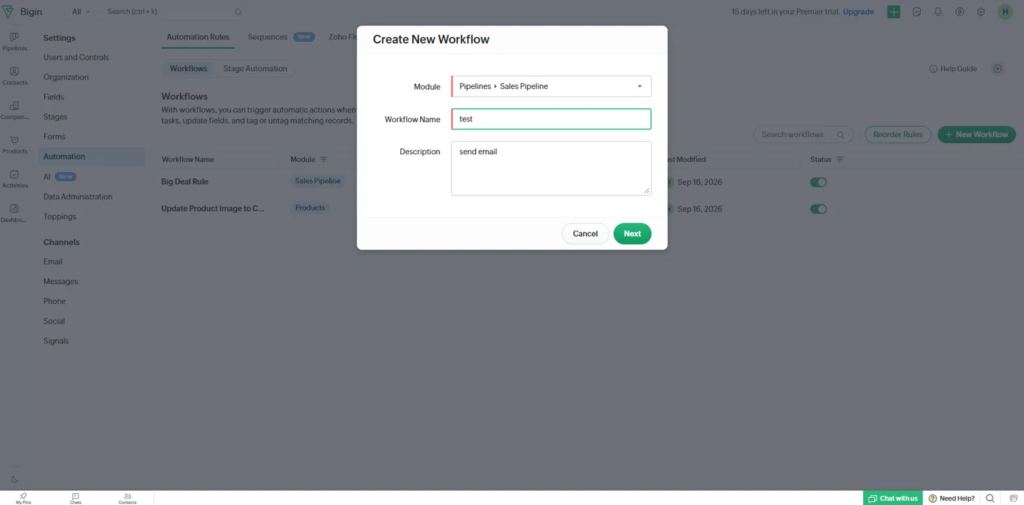
I set up a basic workflow: when a deal moves to a certain stage, trigger an email. The whole thing was a simple modal — pick the module, name the rule, add a description, hit Next. It was genuinely easy to set up, and I didn’t need to look anything up to figure out what to do next.
If you’ve used ClickUp’s automation builder or Zoho CRM’s own workflow rules, Bigin’s version feels like the “solo founder” version of the same idea — fewer options, but also fewer ways to get lost.
The Dashboard: What You See Day to Day
The default dashboard shows the numbers that actually matter at a small scale: contacts created this month, deals won and lost, tasks closed, and a simple bar chart of open deals by stage. Nothing overwhelming — it’s built to be glanced at, not analyzed for an hour.
What I Didn’t Like
To keep this honest: the interface felt slightly slow to load at a few points while I was testing — nothing that broke my workflow, but noticeable enough to mention. If speed is a dealbreaker for you, it’s worth testing yourself during the free trial before committing to a paid plan.
What I Did Like
Overall, Bigin felt convenient and genuinely beginner-friendly. Everything I needed to do — create a deal, move it through stages, set up a basic automation — took less time than I expected, and I never felt like I needed a tutorial to find a button.
Pricing: What You’ll Actually Pay
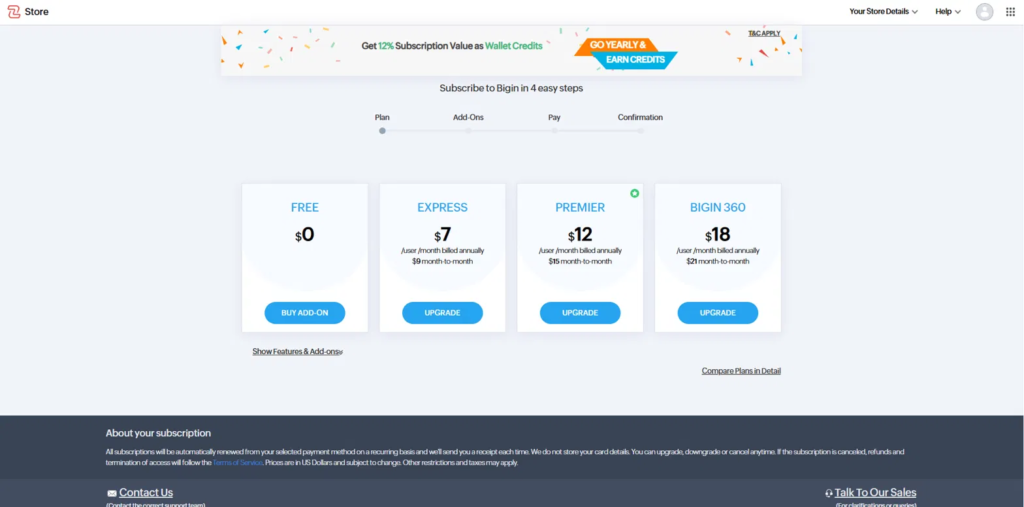
Bigin’s pricing (per user, per month, billed annually):
| Plan | Price (annual) | Price (month-to-month) |
|---|---|---|
| Free | $0 | $0 |
| Express | $7 | $9 |
| Premier | $12 | $15 |
| Bigin 360 | $18 | $21 |
Compare that to Zoho CRM, where the entry paid tier starts higher and is built around teams that need more than a pipeline — think lead management, territory rules, and deeper reporting.
For a solo founder just trying to stop losing track of deals in a spreadsheet, Bigin’s Free plan or the $7/month Express tier will likely cover what you need for a long time before you’d ever need to upgrade to full Zoho CRM.
Who Should Actually Use Zoho CRM Instead
Bigin isn’t the right fit for everyone. If you’re past the “I personally know every deal” stage — say you’re hiring a sales team, need lead scoring, or want to build out multi-department processes — Zoho CRM’s extra depth will save you from outgrowing your CRM in six months.
My Verdict
If you’re a solo founder or a small team under 5 people and your main problem is “I need one clean place to track deals without a learning curve,” Bigin is the more practical starting point. It’s fast to set up, easy to use day-to-day, and priced in a way that won’t feel painful before you’ve made a single sale.
If you already know you need advanced automation, multi-team workflows, or deep customization, Zoho CRM is worth the steeper learning curve — see my Zoho CRM review for the full breakdown.
Related reading: Cal.com vs Calendly: Which Scheduling Tool Is Actually Better for Solo Founders in 2026?
About the author: Henry Nguyen is the founder of Kenvexa, where he personally tests SaaS and AI tools for solo founders and small teams before writing about them. No recycled marketing copy — just real accounts, real screenshots, and honest takes.