If you’re a solo founder or running a small team, you’ve probably landed on this comparison because you’re tired of back-and-forth emails trying to schedule a call. Cal.com and Calendly are the two names that come up again and again — so I signed up for Cal.com myself, built a real event type, and connected it to my calendar to see how it actually feels to use, not just what the feature lists say.
The Quick Answer
If you want a generous free plan with no limits on how many event types you can create, Cal.com is the stronger pick for solo founders on a budget. If you want the most polished, “everyone already knows how to use it” experience and don’t mind paying, Calendly is still a safe choice — but its free plan is more of a trial than something you can build a business around.
My Hands-On Experience Setting Up Cal.com
I created a free Cal.com account and set up a basic “30 min call” event type — the kind of booking link most solo founders would use for client calls or discovery calls.
Here’s what stood out:
Setup was exactly as fast as I expected. I filled in the title, description, duration, and location (Cal.com defaults to its own built-in video calling tool, Cal Video, which was a nice surprise since I didn’t need to connect Zoom separately). The whole thing took a few minutes from start to finish.
Nothing was confusing. I didn’t have to guess what any setting did or dig through help docs — the interface labels things clearly (Basics, Availability, Booking form, Confirmation, Appearance are all separate, clearly named tabs).
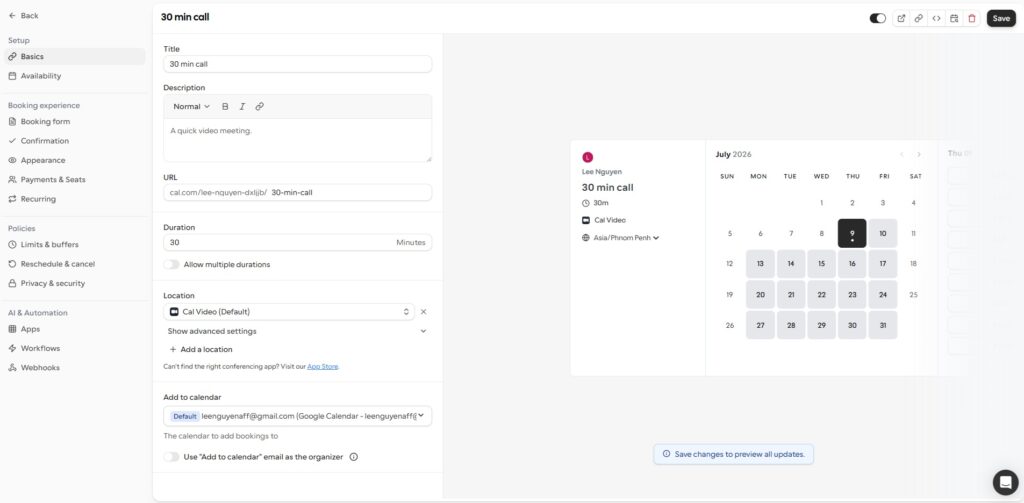
Google Calendar connected automatically. My event type was already linked to my Google account without extra setup. Honestly, this felt like exactly what should happen by default — useful, but not something that blew me away. It’s the kind of thing you only notice if it’s missing.
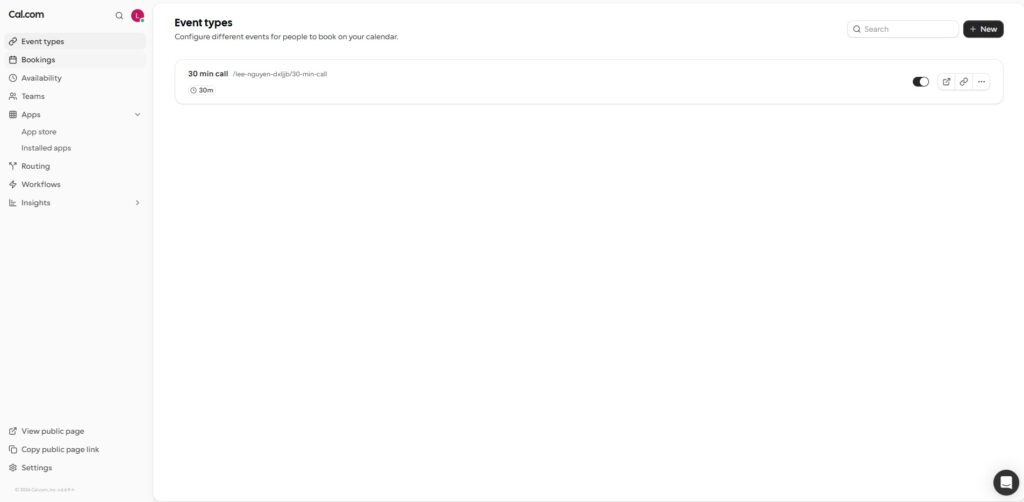
What I’d tell a fellow solo founder: if you’ve never used a scheduling tool before, Cal.com‘s free plan is genuinely usable from day one — not a stripped-down trial version. You can create more than one event type (something Calendly’s free plan won’t let you do), which matters if you need separate booking links for, say, sales calls versus support calls.
Cal.com vs Calendly: What Actually Differs
Free plan. This is the single biggest difference for solo founders. Cal.com‘s free plan doesn’t limit how many event types you can create. Calendly’s free plan limits you to one — which means most people upgrade to a paid plan almost immediately just to get a second booking link.
Pricing. Calendly’s paid plans start around $10-12/user/month for the Standard tier, climbing to $16-20/user/month for team features. Cal.com‘s Teams plan sits around $15/user/month and already includes round-robin scheduling and routing forms at that price.
Ease of use. Calendly still has the edge for absolute zero learning curve — it’s been the default scheduling tool for over a decade, so most of your clients or leads will already recognize the booking flow. Cal.com has closed the gap a lot, and based on my own setup experience, I didn’t find it harder to use — but Calendly’s familiarity is a real advantage if your invitees are less tech-savvy.
Integrations. If you rely heavily on a CRM like HubSpot or Salesforce and want everything to sync without extra setup, Calendly’s integrations are more mature out of the box. Cal.com covers the essentials (Google Calendar, Zoom, Stripe, Zapier) but leans more on an app-marketplace model, so some integrations take more setup work.
Customization. Cal.com wins here — you can customize the booking page more deeply, and if you ever want full control, it’s open-source, meaning you could self-host it later if data ownership becomes a priority.
Who Should Choose Cal.com
Solo founders and small teams who want a real, usable free plan (not just a trial). Anyone who wants more than one event type without paying. People comfortable with a slightly more flexible, DIY-friendly interface.
Who Should Choose Calendly
Teams that already rely heavily on Salesforce, HubSpot, or similar CRMs. Founders whose clients specifically expect the “classic” Calendly booking experience. Anyone who wants the absolute path of least resistance and doesn’t mind paying for it.
My Verdict
For solo founders and small teams — the exact audience I’m writing for on Kenvexa — Cal.com is the more practical starting point. The free plan is functional enough to actually run your scheduling on, not just test it out, and based on my own setup, it’s just as easy to use as its reputation-heavy competitor.